> ## Documentation Index
> Fetch the complete documentation index at: https://koreai-agent-management-platform-dev.mintlify.app/llms.txt
> Use this file to discover all available pages before exploring further.
# Standard Responses
[Back to NLP Topics](/ai-for-service/automation/natural-language/nlp-topics)
Standard responses are pre-defined NLP interpreter messages the AI Agent displays based on events, triggers, user inputs, or system conditions. You can customize all defaults and add channel-specific overrides.
Go to **Automation AI > Conversation Intelligence > Conversation Management > Standard Responses**.
For each response category, the trigger or user input is listed alongside the default response(s). The NLP interpreter randomly selects from multiple responses at runtime.
***
## Response Categories
| Category | Description |
| --------------------- | ---------------------------------------------------------------------------------------------------- |
| **Statements** | Responses triggered by AI Agent or user actions — for example, task cancellation or invalid input. |
| **Queries** | Questions the AI Agent asks for more information — for example, *Which field do you want to change?* |
| **Errors & Warnings** | Messages displayed during errors — for example, *End date cannot be before the start date.* |
| **Questions** | General questions posed to the user that don't fit other categories. |
| **Choices** | Yes/No prompts — for example, *Would you like to receive push notifications?* |
| **Greeting** | Initial responses when the app starts or when a user returns after inactivity. |
***
## Statements
Responses triggered by actions from the AI Agent or user.
| Message | When It Appears |
| --------------------------------------------------------------------------------------------- | ---------------------------------------------------------------------------------------------------------------------------------------------- |
| When the user confirms to close the conversation in a language and switch to another language | User ends a conversation in one language and starts the next in a different language. |
| When only field prompt is present in the OOB | Internal field prompt for action and alert tasks. Not recommended for customization by enterprises. |
| When language preference is set | User switches language using *cheat lang* or picks from language options. |
| When task is not accessible to user | Developer tries to access an app task they don't have permission for. |
| User confirms alert setup | An alert is set up successfully (Alert Task only). |
| User discards/abandons the current activity | User says *discard*, or the task fails due to max retries, invalid LoV, or cURL error. |
| User implies to end the conversation | User says *bye*, *good night*, etc. Shown when the Follow-up Intents list is presented at dialog end. |
| Location provided by user is invalid | AI Agent cannot validate input for a Location-type entity. |
| Amending an Alert field | User says *Yes* to amend alert parameters (Alert Task only). |
| Amending a task which has no fields | Task has no entities to amend (Alert, Action, and Information Tasks). |
| Ask at least one optional field | User did not provide any optional field value when at least one is required (Action Task only). |
| Topic retry limit exceeded | Developer mode only. Dialog looped through the same nodes beyond the allowed limit. |
| Universal fallback response | AI Agent cannot generate a response for any reason, or maximum node execution limit exceeded. |
| Server returned authorization failure | Authorization failure occurred during script or API execution. |
| User selects a valid option from a list | User selects an action/alert/info task from the listed options. |
| User selects an action | User selects an action task; AI Agent confirms and asks for required parameters. |
| Alert is identified, ask for alert time | Displayed when Trigger Interval is set to *At a specific time*. |
| Alert is identified, ask for alert time interval | Displayed when Trigger Interval is set to *Every X minutes*. |
| User selects an alert | User selects an alert task; AI Agent confirms and requests required parameters. |
| Task discarded | User types *discard* mid-task. |
| App choosing the default account | Shown during alert amend when AI Agent cannot parse the user's response. |
| Confirmation Dialog for Task consolidated | AI Agent confirms captured parameters before executing an Action/Info task. |
| Confirmation Dialog for Alert consolidated | AI Agent confirms all details before setting up an alert (if confirmation is enabled). |
| Confirmation Dialog for Alert consolidated without fields | Alert has no fields; AI Agent confirms before execution (if confirmation is enabled). |
| The alerts will be muted | Developer has muted alert notifications. |
| Confirmation Dialog when alerts are muted | Shown when *Mute alert notifications* is enabled for an RSS alert. |
| Alert frequency description | Confirmation of alert query frequency for web-service alert tasks. |
| Not understanding the input at confirmation | User's response during alert frequency confirmation does not match the expected input. |
| No results found for the search string | Typeahead field returned no results. |
| Successful task setup | Alert task set up successfully. |
| I am not sure what you mean | One or more low-confidence intents found. Usually shown as FAQ suggestions. |
| Ambiguity in intent recognition | AI Agent failed to identify user intent; prompts user to rephrase. |
| User has selected daily alert — ask for frequency or specific time | Both *frequency interval* and *specific time* options are available. |
| App needs to present filter options | Multiple filters available during alert setup. |
| App needs to present filter options with exit option | Same as above, but includes an option to skip. |
| User finished configuring filters | Filter configuration for an alert task completed. |
| User asks *Who am I* | User types *Who am I*. |
| User asks for help | User types *Help*; AI Agent lists available tasks. |
| Skipped values | Part of confirmation message for Action/Info tasks — shows skipped (optional) parameters. |
| Ask user to change dependent field | A dropdown depends on another field, but the Platform cannot fetch data from that field. |
| When there is no data | User chooses to change account but responds *no* to the AI Agent's confirmation. |
| When date given in invalid format | User enters an unrecognizable date format. Valid formats: YYYY-MM-DD, DD-MM-YYYY, 1 Jan 1982, *Next Friday*. |
| Follow-up sentence post task discard | AI Agent confirms task was discarded and offers to restart. |
| Confirmation Dialog for task with skipped fields | Confirmation before executing an Action/Info task when some optional fields were not provided. |
| Listing all tasks | Displayed when user types *Help* and no task matches. |
| Listing all alerts | Displayed when user types *Help* and the app has only alert tasks. |
| Listing all FAQs | Displayed when user types *Help* — includes Knowledge Graph collections. |
| Listing all alerts after tasks | Shown when app only has alert tasks and intent is not identified. |
| Listing all alerts after tasks and FAQs | Shown when all task types are configured and user types *Help*. |
| Lists all actions and FAQs | No matching task found; lists actions and FAQs. |
| Lists all alerts and FAQs | No matching task found; lists alerts and FAQs. |
| When app has no tasks | Developer tries to run an app without any tasks. |
| When a server call fails | Webhook or service node call failed; task is discarded. |
| User prompt when a task is discarded due to server call failure | API call did not complete successfully. |
| Specific app is not available | App is not yet published. |
| Field title and value in confirmation | Part of the confirmation step — shows captured field values for alert, action, or info tasks. |
| Recursive dialog found | AI Agent recursively called the same dialog and exceeded the limit (100). |
| Loop limit reached for a node | Same node invoked repeatedly beyond the allowed number of times. |
| Message component doesn't have a message | Message or Service node returned empty content. |
| User says thanks | User thanks the AI Agent. |
| User says OK, fine, yes | Shown after task completion when the user acknowledges positively. |
| User says no, nope | Small talk response to negative acknowledgments. |
| User says great, awesome | Shown after task completion when the user responds positively. |
| User says that helped, that was useful | Shown after positive feedback (great, cool, fair enough, that helped). |
| User says I am done | Shown when user indicates they are finished (done, that's all, that's it). |
| Successfully added filter | A filter was added to an alert. |
| After successfully adding a filter, showing filter options again | Shown when a filter is applied to an alert (Alert Task only). |
| User gave invalid input for filter | Filter name doesn't match any configured filter. |
| Resume paused task | User chooses to resume on-hold task. Shown only when Resume option is *Notify the user with a message that the on-hold task is being resumed*. |
| Notify the user that we have canceled the paused task | User chose not to resume the on-hold task during confirmation. |
| Notify the user that we have canceled the current task to switch to another | Hold option is *Discard the current task and switch to new*. |
| When an interruption is identified but hold is not allowed | New intent detected during task execution; new intent added to follow-up list (current task continues). |
| Service call timed out | Third-party API call (webhook or service node) timed out. |
| Dialog has no transitions | Dialog task has only an Intent node and no further flow defined. |
| Manage account | User says *manage accounts*, *add phone number*, *delete account*, etc. |
***
## Queries
Questions the AI Agent asks users for more information.
| Message | When It Appears |
| ---------------------------------------------------------------------- | -------------------------------------------------------------------------------------------------------- |
| Ask if user would like to switch to a new language (multiple detected) | Multiple new languages detected mid-conversation; user asked to select preferred language. |
| Ask if user would like to switch to a new language (single detected) | A different language detected; user offered option to switch or continue. |
| Follow-up sentence post task execution or discard | Task completed or discarded; user offered option to restart. |
| Confirmation before discard | User types *Discard* or *Discard All* during task execution (applies to select clients). |
| User types *Change* or similar words | User changes their mind during alert filter setup; alert setup is discarded. |
| User prompted to enter text to search | Typeahead field prompt (Action, Alert, Info tasks). |
| Ask the user to enter alert frequency | Frequency can be interval or specific time (Alert only). |
| Ask the user to enter alert interval | Frequency is an interval, e.g., every 4 hours (Alert only). |
| Ask the user to enter alert time | Frequency is a specific time, e.g., daily at 9:00 am. |
| Alert identified — ask for frequency | Prompted based on schedule options defined by the alert developer. |
| Prompting user to enter name for alert instance | User installs alert in Kore messaging rooms. |
| User needs to select from a static dropdown | Filter field type is *static dropdown*. |
| User needs to select from a search results list | Filter field type is *dynamic dropdown*. |
| Request for email address for webhook instructions | Webhook alert setup — developer email needed for configuration instructions. |
| Query to get the alert instance description | User prompted to provide a description during alert setup. |
| Tell me the alphabet or unique word for the action | Displayed before a list of options when no custom template is used. |
| I am not sure what you mean after an invalid choice | User's follow-up doesn't match any of the initially identified ambiguous alerts. |
| Asking user to pick an alert | A list of alerts is shown; user prompted to select one. |
| Asking user to pick an alert after an error | User selected an invalid option from the alert list. |
| When user responded with invalid answer to confirmation dialog | User said they want to amend but the AI Agent didn't understand what — confirmation repeated. |
| Typeahead field prompt (first field in task) | First field in task is a typeahead type. |
| Ask user what to rename the alert | User chose to change/amend the alert name. |
| After user amends a parameter — ask if anything else to change | User amended a parameter; AI Agent asks if further changes are needed. |
| No results found for search string — ask to try again | Typeahead field query returned no results. |
| Follow-up sentence post discard — Part 2 | At alert confirmation, user said *no* twice. |
| Listing ambiguous tasks | User prompted to pick a task from a list; response led to ambiguity. |
| Ask if user wants to continue the paused task | Shown after the interrupting task completes (Resume option: *Get confirmation before resuming*). |
| Ask if user would like to switch | Hold & Resume is set to *Allow the end user to select the behavior*; AI Agent confirms before switching. |
***
## Errors & Warnings
Messages displayed when errors or validation issues occur.
| Message | When It Appears |
| ---------------------------------------------------------- | ------------------------------------------------------------------------------------------------------ |
| Agent transfer fallback response | Agent unavailable, wait time exceeded, or agent transfer failed. |
| User exceeds maximum retries for an entity (task on hold) | User exceeded max retries while another task is on hold. |
| Dialog task associated to FAQ is not available | The dialog linked to a FAQ was suspended, deleted, or not assigned to the user. |
| User needs to authorize or re-authorize | End-user authorization or re-authorization is required. The authorization URL is appended dynamically. |
| User authorization has failed or is yet to authorize | Task requires authorization; AI Agent provides an authorization link. |
| User's intent recognized, but authorization fails | Service call needs authorization and no account has been authorized yet. |
| User authorization failed more than 3 times | User entered wrong credentials three times in a row. |
| User provided value is not unique | User's input causes ambiguity when selecting from a partially matched intent list. |
| App did not find any options based on user's choice | Option set is empty, or no account credentials are available. |
| Discarding task — no options found for list or lookup | User input not found in service call response (dynamic dropdown or typeahead field). |
| Task identified, but server call failed | Kore account for the third-party API expired or failed. |
| User enters invalid email | Invalid email address entered for an alert, action, or info task. |
| User enters invalid country | Invalid country name entered. |
| User enters invalid URL | Invalid URL entered. |
| User enters invalid phone number | Invalid phone number entered. |
| User enters invalid number | Non-numeric input entered for a number field. |
| Invalid date format | Invalid date format entered. |
| Missing date | No date provided for a date field. |
| Ask user to enter time for a field | Time missing for a DateTime entity in a dialog task. |
| Ask user to enter time | User provided only a date for a DateTime entity (e.g., scheduled appointment). |
| Invalid time — ask to try again for a field | User's time input for a DateTime entity is missing or invalid. |
| Invalid time — ask to try again | User entered an invalid time value (e.g., Aug 29 at 25). |
| Missing date/time | Error prompt for DateTime entities in Actions and Alerts. |
| You have chosen a wrong choice | Sub-response used when a user selects an invalid option from a list. |
| Cannot understand your request | AI Agent fails to identify intent; lists available tasks and FAQs. |
| App is selected, user asked for reauthorization | API call failed due to expired credentials. |
| Listing all tasks after wrong choice | User selected an invalid option; app has only Actions/Dialogs/Info tasks. |
| Listing all alerts after wrong choice | User selected an invalid option; app has only Alert tasks. |
| Listing all FAQs after wrong choice | User selected an invalid option; app has only FAQs. |
| Listing all FAQs — not understanding request | App has only a Knowledge Graph and fails to understand intent. |
| Listing all actions — not understanding request | App has only Action tasks and fails to understand intent. |
| Listing all actions and alerts — not understanding request | App has only Action and Alert tasks and fails to understand intent. |
| Listing all actions and FAQs — not understanding request | App has only Actions and a Knowledge Graph and fails to understand intent. |
| Listing all alerts — not understanding request | App has only Alert tasks and fails to understand intent. |
| Listing all alerts and FAQs — not understanding request | App has only Alert tasks and a Knowledge Graph and fails to understand intent. |
| Listing all tasks — not understanding request | App fails to understand intent; shows all available tasks. |
| Listing all tasks and alerts after wrong choice | User selected an invalid option; app has tasks and alerts. |
| Listing all alerts, tasks, and FAQs after wrong choice | User selected an invalid option; app has all task types. |
| Lists all actions and FAQs after wrong choice | App has only Actions and a Knowledge Graph; user selected an invalid option. |
| Lists all alerts and FAQs after wrong choice | App has only Alerts and a Knowledge Graph; user selected an invalid option. |
| Task discarded — user exceeded maximum allowed attempts | User entered an invalid entity format five times. |
| Entity component in dialog has no error prompt | Entity node has no error prompt defined. |
| Entity component in dialog has no message attribute | Entity node has no message prompt defined. |
| User input exceeds maximum sentence or word limit | Input exceeds the allowed character or word count. |
***
## Questions
General questions the AI Agent poses to users that don't fit other categories.
| Message | When It Appears |
| ---------------------------------------------- | ------------------------------------------------------------- |
| When user input matches and frequency is asked | User input led to ambiguity while setting an alert frequency. |
| Ask user to input alert frequency | Prompt for frequency at which the alert task will run. |
***
## Choices
Yes/No prompts used during alert and task setup.
| Message | When It Appears |
| ----------------------------------------------------------------- | --------------------------------------------------------------------------------------------------------- |
| Search results displayed (type-ahead search) | User input triggered a typeahead search in an alert filter (Alert Task only). |
| Confirming alert frequency | App confirms current alert trigger frequency with the user. |
| Repeat confirmation of default alert frequency | User input doesn't match the expected frequency response. |
| Confirmation to set up alert with frequency | Confirm the trigger frequency for an alert. |
| Prompting user to set up filters | App asks whether the user wants to configure alert filters. |
| Prompting user to set up filters as soon as alert is identified | Same as above — triggered immediately on alert identification. |
| Asking user to set up push notifications | User wants to amend the alert notification setting. |
| Repeat — asking user to set up push notifications | User's response to notification setting doesn't match yes/no. |
| Amending the description | User wants to change the alert description. |
| Amending the frequency | User wants to change the alert trigger frequency. |
| Amending notification settings | User wants to change whether notifications are enabled. |
| Prompting user to choose days of the week | User selecting Weekday/Weekend for trigger frequency. |
| Query to choose interval for frequency | User prompted to select a frequency interval. |
| Query to send webhook setup instructions via email | App checks if developer wants webhook configuration instructions emailed. |
| Do you want to change the alert name? | User wants to amend the alert name. |
| Query to choose operator while setting up a filter | User prompted to select an operator for an alert filter. |
| Options to pick frequency for alert notification days | All interval options available (Daily, Weekday, Weekend). |
| When the user needs to choose from provided choices | User prompted to pick from a dropdown in alerts or actions. |
| Confirm if user wishes to reuse a pre-saved context | Prompted when a pre-saved context is available for reuse. |
| Show possible intervals for alert schedule | User entered a specific time, but only intervals are valid. |
| Show closest frequency for alert schedule | User's input doesn't match available frequencies; nearest option shown. |
| Show closest time for alert schedule | User's input doesn't match available times; nearest option shown. |
| When changing a field | User selected *No* during alert parameter confirmation. |
| Prompting to set up filters after alert identified | User provides input to set up an alert that has filters configured. |
| Ask if setup instructions should be sent via email (first prompt) | First prompt in alert setup is to ask about emailing setup instructions. |
| While choosing options | Shows options from the Platform for a typeahead entity in an action or alert. |
| After selecting task — ask about schedule | Alert selected from list; AI Agent asks how often the user wants to be notified. |
| Wrong choice for task schedule | User entered invalid frequency for an alert; AI Agent asks again. |
| After selecting task — ask for field value | First field in an action or alert is a dropdown. |
| User says *no* for alert setup confirmation | User chose not to proceed with the alert configuration; offered to amend. |
| After selecting task — user selects wrong choice in dialog | User entered an invalid choice from a non-LoV list. |
| User enters wrong choice for alert frequency | Alert frequency value doesn't match options defined by the developer. |
| User enters wrong value for a dropdown | Input doesn't match any value in the List of Values. |
| List ambiguous LoV values | Multiple partial matches for a List of Values entity; user asked to select. |
| User enters invalid choice for an action | User's response doesn't match the presented task list. |
| Ambiguous date | User entered an ambiguous date (e.g., 6/9); both interpretations shown. |
| Ambiguous airport | User entered an airport name that matches multiple airports (e.g., London). |
| Ambiguous location | Geocode service returned multiple location possibilities. |
| More than one account to pick from | User has multiple third-party accounts; asked to select one. |
| Intent recognized, but more than one account to pick from | Same as above, when intent is identified. |
| Custom lookup returned more than one value | Multiple results returned from a custom list query. |
| Chosen list is empty after selecting a valid choice | Dependent dropdown has no options because the parent field value returned empty results. |
| User selects an invalid choice (dependent dropdown) | Same as above; user's value for the dependent field is invalid. |
| Present follow-up tasks at end of dialog | Shown at end of dialog when Follow-up Task setting is *Yes, ask the user to select a follow-up task*. |
| Ask user to select entity to amend (ambiguous entity value) | Multiple entities share the same value during dialog execution; user asked to clarify which to amend. |
| Max on-hold quantity exceeded — ask user to cancel a task | User tried to put more tasks on hold than the configured maximum. |
| User provides intent when prompted for String/Description entity | User input matched an intent when prompted for a string/description entity; AI Agent asks how to proceed. |
***
## Add and Edit Responses
To add a new standard response:
1. Select a **category tab** and hover over the target situation.
2. Click **Add Response**.
3. In the **Add Channel Overrides** dialog:
* Select a **channel** (or **Any Channel** for all channels).
* For channel-specific responses, select a **task** and optionally a **field**.
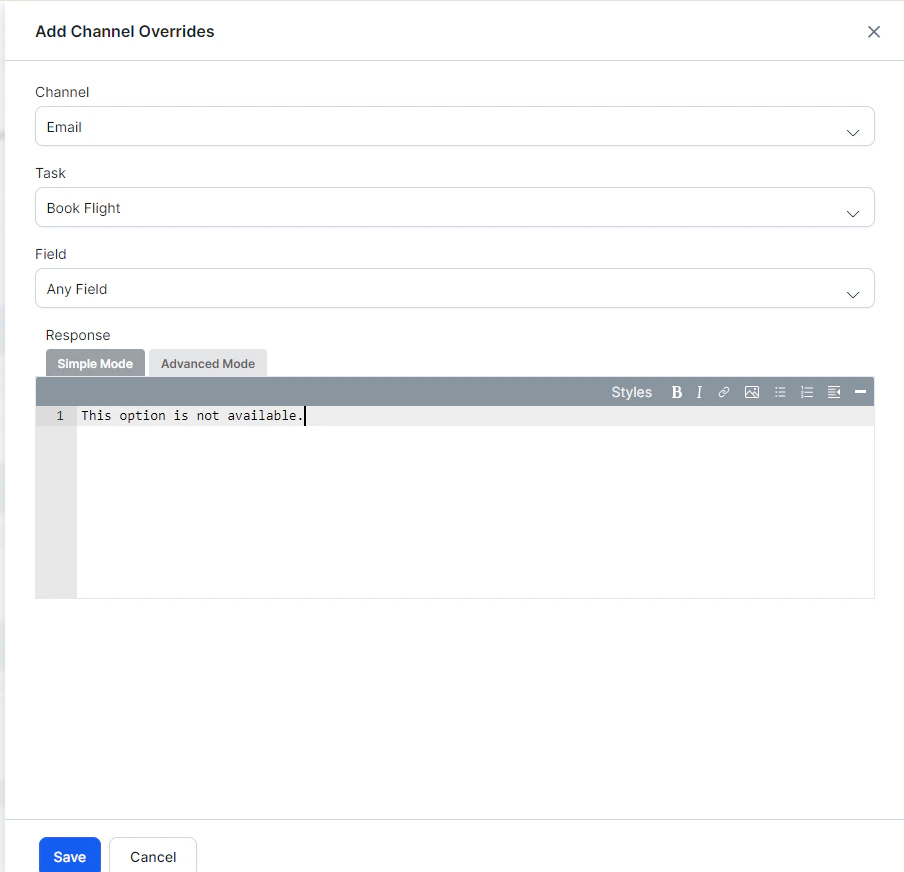 4. In the **Response** editor:
* **Simple Mode** — Enter plain text with optional formatting (bold, italics, hyperlinks, lists).
* **Advanced Mode** — Enter JavaScript for custom channel-specific messages. Use `response.message` for the default message string and `response.choices` for the options array.
5. Click **Save**.
### Channel Override Examples
**Slack:**
```js theme={null}
var message = {};
var attachments = [];
var attachment = {
'text': "Exception occurred during API execution",
'color': '#FFCC00',
'attachment_type': 'default'
};
attachments.push(attachment);
message.attachments = attachments;
print(JSON.stringify(message));
```
**Facebook:**
```js theme={null}
var message = { text: response.message };
var buttons = [];
for (var i = 0; i < response.choices.length; i++) {
var choiceItem = response.choices[i];
if (choiceItem.length > 20) {
choiceItem = choiceItem.substring(0, 18) + '..';
}
buttons.push({
content_type: 'text',
title: choiceItem,
payload: choiceItem
});
}
message.quick_replies = buttons;
print(JSON.stringify(message));
```
**SMS:**
```js theme={null}
var message = {};
var indexArray = ['a','b','c','d','e','f','g','h','i','j','k','l','m','n','o','p','q','r','s','t','u','v','w','x','y','z'];
var text = response.message + '\n';
for (var i = 0; i < response.choices.length; i++) {
text = text.concat(indexArray[i] + ') ' + response.choices[i] + '\n');
}
message.text = text;
print(JSON.stringify(message));
```
**Email:**
```js theme={null}
var message = {};
var text = response.message + ' ';
for (var i = 0; i < response.choices.length; i++) {
text = text.concat('' + response.choices[i] + '
4. In the **Response** editor:
* **Simple Mode** — Enter plain text with optional formatting (bold, italics, hyperlinks, lists).
* **Advanced Mode** — Enter JavaScript for custom channel-specific messages. Use `response.message` for the default message string and `response.choices` for the options array.
5. Click **Save**.
### Channel Override Examples
**Slack:**
```js theme={null}
var message = {};
var attachments = [];
var attachment = {
'text': "Exception occurred during API execution",
'color': '#FFCC00',
'attachment_type': 'default'
};
attachments.push(attachment);
message.attachments = attachments;
print(JSON.stringify(message));
```
**Facebook:**
```js theme={null}
var message = { text: response.message };
var buttons = [];
for (var i = 0; i < response.choices.length; i++) {
var choiceItem = response.choices[i];
if (choiceItem.length > 20) {
choiceItem = choiceItem.substring(0, 18) + '..';
}
buttons.push({
content_type: 'text',
title: choiceItem,
payload: choiceItem
});
}
message.quick_replies = buttons;
print(JSON.stringify(message));
```
**SMS:**
```js theme={null}
var message = {};
var indexArray = ['a','b','c','d','e','f','g','h','i','j','k','l','m','n','o','p','q','r','s','t','u','v','w','x','y','z'];
var text = response.message + '\n';
for (var i = 0; i < response.choices.length; i++) {
text = text.concat(indexArray[i] + ') ' + response.choices[i] + '\n');
}
message.text = text;
print(JSON.stringify(message));
```
**Email:**
```js theme={null}
var message = {};
var text = response.message + ' ';
for (var i = 0; i < response.choices.length; i++) {
text = text.concat('' + response.choices[i] + '
');
}
message.text = text;
print(JSON.stringify(message));
```
### Customizing Ambiguity Display with `getChoices()`
Use `getChoices()` to retrieve ambiguous intent choices and display them in a custom format (for example, as buttons):
```js theme={null}
var info = getChoices();
var message = {
"type": "template",
"payload": {
"template_type": "button",
"text": "Did you mean",
"subText": "You can now customize response for did you mean",
"buttons": []
}
};
for (var i = 0; i < info.length; i++) {
message.payload.buttons.push({
"type": "postback",
"title": info[i],
"payload": "payload1"
});
}
print(JSON.stringify(message));
```
Built with [Mintlify](https://mintlify.com).