> ## Documentation Index
> Fetch the complete documentation index at: https://koreai-agent-management-platform-dev.mintlify.app/llms.txt
> Use this file to discover all available pages before exploring further.
# Adding the WeChat Channel
[Back to Available Channels](/ai-for-service/channels/adding-channels-to-your-bot#available-channels)
To set up WeChat as a channel, you need to register for a WeChat Official Account. You also need to enable webhook integrations for the Platform to send and receive messages.
Please refer to the WeChat Official Accounts [Registration Process](https://admin.wechat.com/cgi-bin/readtemplate?t=ibg_en/en_faq_tmpl\&type=info\&lang=en_US) for more information.
For development purposes, you may also use the WeChat Sandbox environment to integrate the assistant and test functionality. This article takes you through the setup process.
## Step 1: Set up a WeChat Sandbox Account
1. Register and login to the WeChat Sandbox environment from [here for English](https://mp.weixin.qq.com/?lang=en_US\&token=) and [here for Chinese](https://mp.weixin.qq.com/?lang=zh_CN\&token=) versions.
2. Click the **Login** button to continue.
3. You would be required to install the WeChat mobile app to allow sign in using the QR presented on-screen.
4. Scan the **QR code** and confirm Login to proceed.
5. Post successful sign-in, you would be redirected to the Sandbox portal.
6. The Sandbox portal provides information about your WeChat Sandbox App ID and App Secret.
7. Make note of **App ID** and **App Secret**.
8. You need to enter the WebHook **URL** and **Token**, you can obtain these values from the Channel page of the Platform as explained below.
## Step 2: Set up a Webhook
1. In the Platform, select the assistant that you want to add the WeChat channel to.
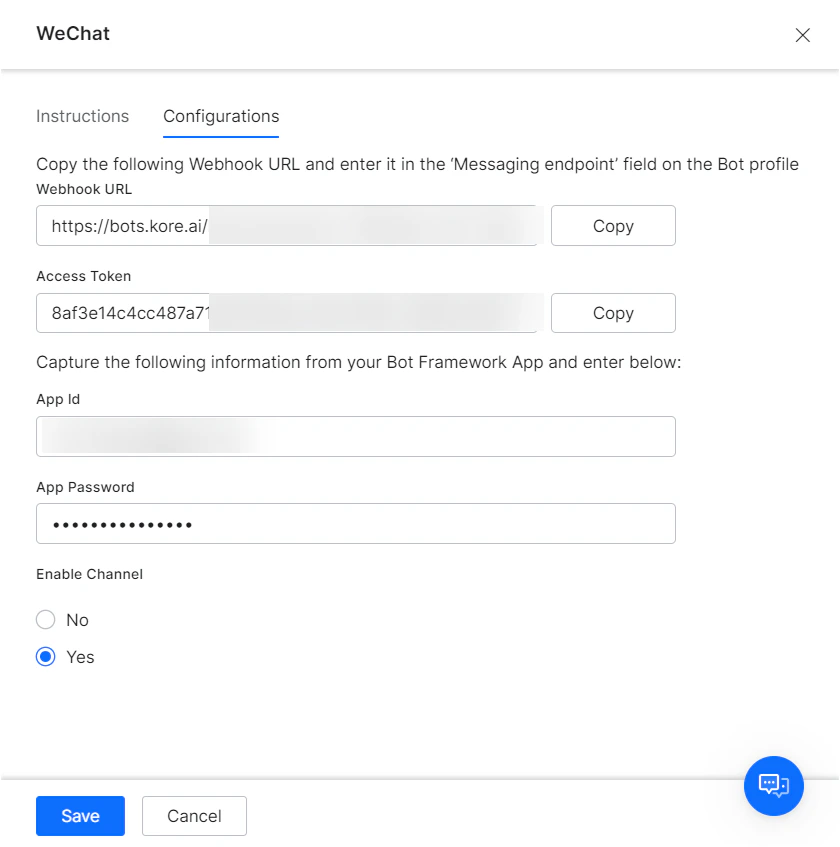
2. Go to **Channels & Flows** > **Channels** > **Digital** > **All** > **WeChat**.
3. Navigate to the **Configurations** tab and enter the following details:
* **App Id** - *App Id* from the weChat Sandbox portal page.
* **App Password** - *App Secret* from the weChat Sandbox portal page.
4. Make a note the following details
* *Webhook URL*, and
* *Access Token*
5. Update the **WeChat Sandbox portal page** with the above URL and access token and **Save** the details.
6. **Enable** the weChat channel from the Platform.
 After enabling the channel and verifying all the configurations, you can optionally publish the assistant for the new channel. Learn more about [Publishing your App](/ai-for-service/deployment/publishing-app).
Built with [Mintlify](https://mintlify.com).
After enabling the channel and verifying all the configurations, you can optionally publish the assistant for the new channel. Learn more about [Publishing your App](/ai-for-service/deployment/publishing-app).
Built with [Mintlify](https://mintlify.com).