> ## Documentation Index
> Fetch the complete documentation index at: https://koreai-agent-management-platform-dev.mintlify.app/llms.txt
> Use this file to discover all available pages before exploring further.
# Account or Workspace
The platform organizes users and resources through **Workspaces**. A workspace is a container for users, applications, and access controls. When you join the platform, you either join an existing workspace or are assigned a new one.
Workspaces come in two types — **Standard** and **Enterprise** — each with different features, usage limits, and licensing options.
To learn how workspaces are created for different usage scenarios, see [Accessing the Platform](/ai-for-service/getting-started/accessing-the-platform).
***
## Roles
| Role | Description |
| ------------------- | --------------------------------------------------------------------------------------------------------------------------------------------------------------------------------- |
| **Workspace Owner** | The user who created the workspace. Has access to the Administration Console and Manage Workspace. Can invite users, manage roles, and view plan and usage details. |
| **App Owner** | The user who created an app. Can invite collaborators, transfer ownership, and own multiple apps. Workspace Owners can also change app ownership from the Administration Console. |
| **Collaborator** | A user invited to collaborate on an app. Has limited access based on their assigned role. A user can be a collaborator on some apps and an owner on others. |
## Workspace Types
Every workspace is classified as **Standard** or **Enterprise**. Licenses, usage, and limits are governed by Kore.ai's terms and conditions for your workspace type.
### Standard Workspace
All new workspaces start as Standard.
* New apps include a free trial period. After the trial, you can subscribe to the **Essential Plan** or **Advanced Plan**.
* Workspace or App Owners can request an upgrade to Enterprise. Kore.ai's Customer Support team will process the request.
### Enterprise Workspace
Enterprise workspaces offer premium features, higher usage limits, and higher rate limits. Business accounts with custom contracts are automatically upgraded to Enterprise.
* Features, usage limits, and rate limits are governed by your license agreement.
* All apps in an Enterprise Workspace are assigned to the **Enterprise Usage Plan**. See [Usage Plans](/ai-for-service/manage-assistant/plan-and-usage/billing-and-payments).
***
## Enterprise Upgrade Flow
### Product-Specific Upgrades
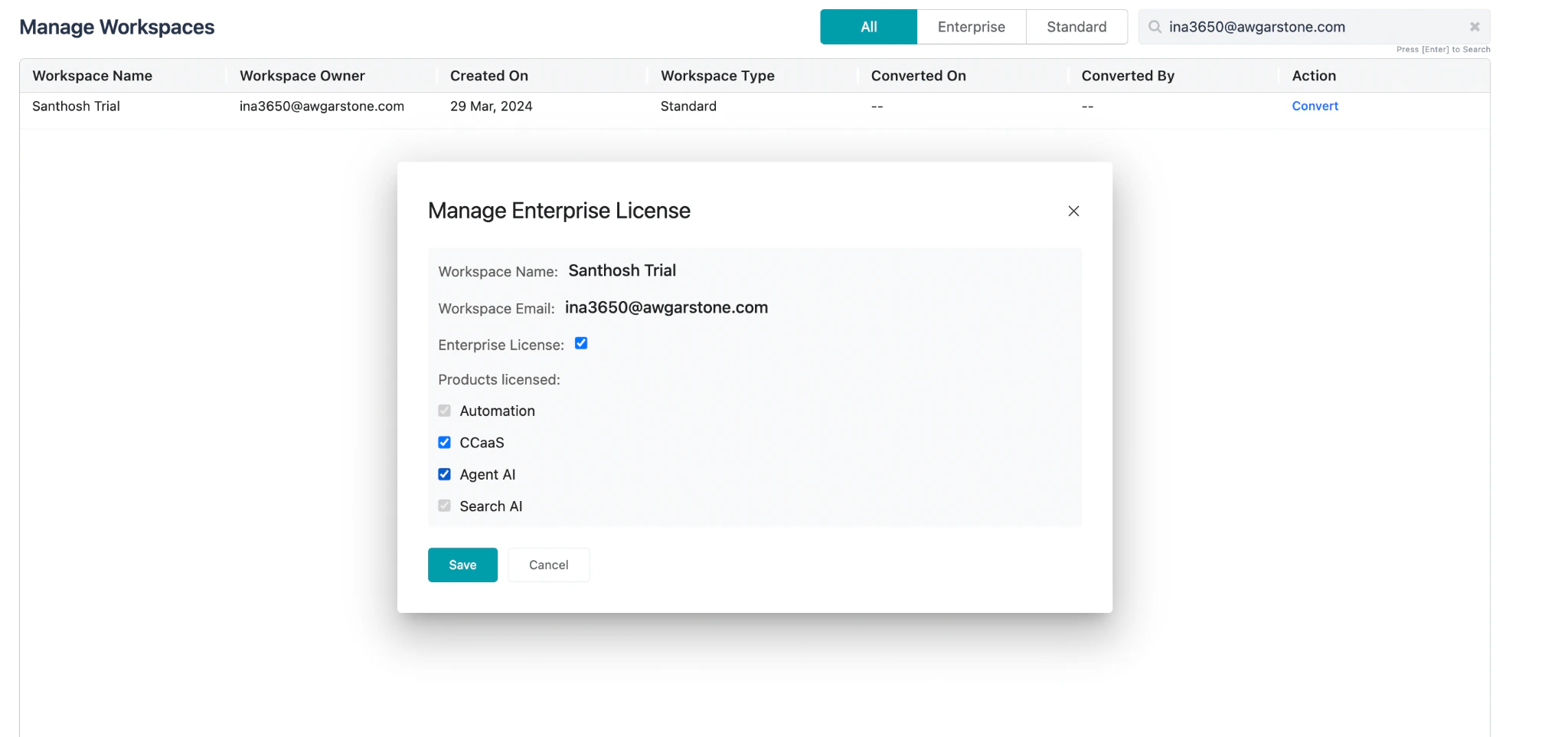
Enterprise upgrades apply only to the products included in your license. For example, purchasing only Search AI upgrades the workspace for Search AI only — other products remain unchanged.
 ### Post-Upgrade Access
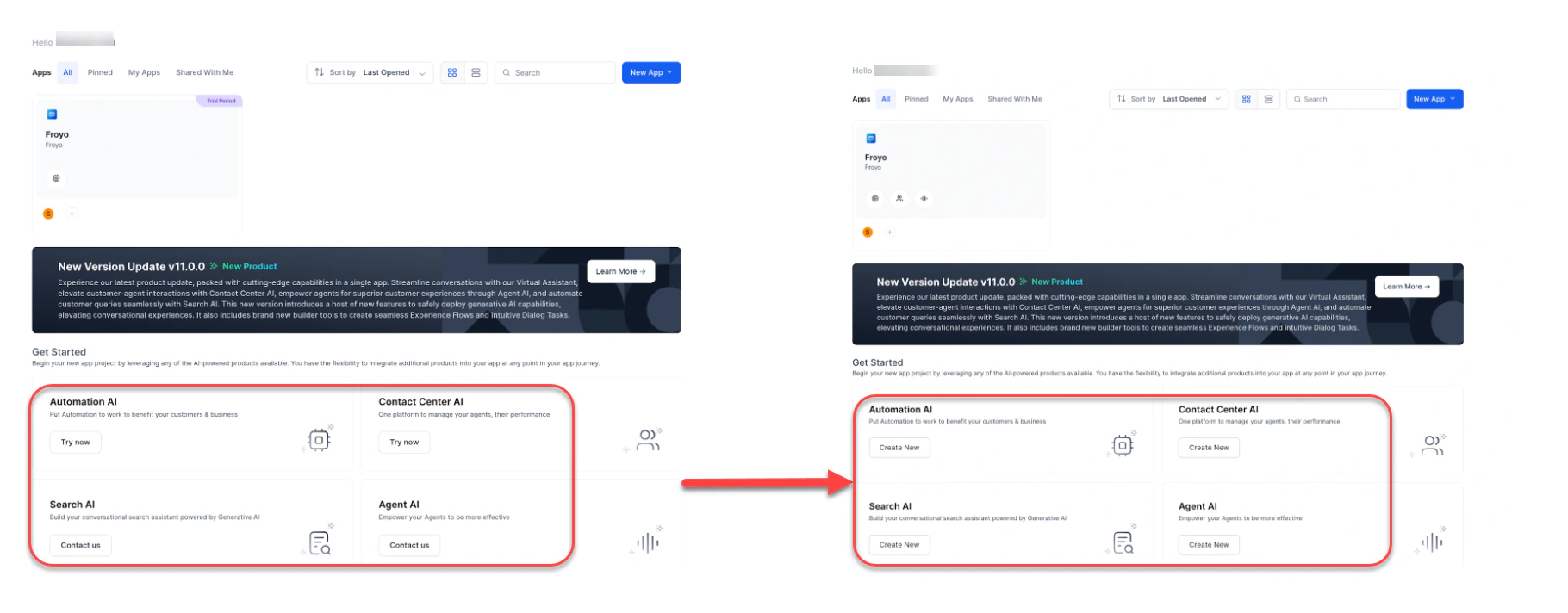
After the upgrade, users can immediately access licensed products without going through the trial flow again.
| Before Upgrade | After Upgrade |
| ----------------------------------------------------- | --------------------- |
| **Try Now** button (Automation AI, Contact Center AI) | **Create New** button |
| **Contact Us** button (Search AI, Agent AI) | **Create New** button |
### Post-Upgrade Access
After the upgrade, users can immediately access licensed products without going through the trial flow again.
| Before Upgrade | After Upgrade |
| ----------------------------------------------------- | --------------------- |
| **Try Now** button (Automation AI, Contact Center AI) | **Create New** button |
| **Contact Us** button (Search AI, Agent AI) | **Create New** button |
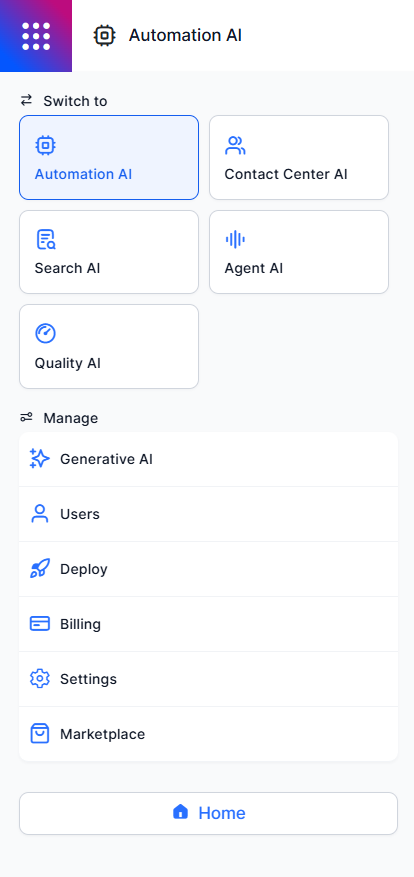
 Inside an app, users can access all products for which the enterprise holds a license.
 ### Partial Product Upgrades
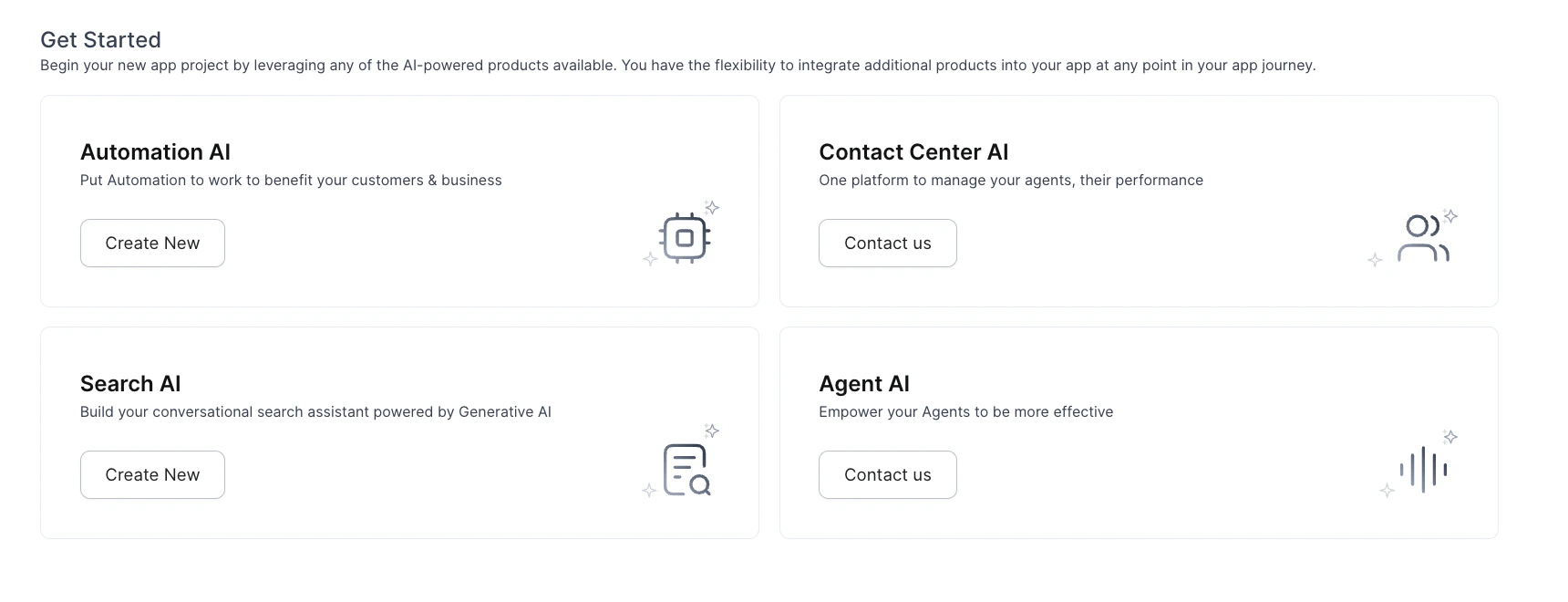
When only certain products are upgraded, users can create apps only for those products. Products without an enterprise license remain unavailable.
In the example below, only Automation AI and Search AI have enterprise licenses. Contact Center AI and Agent AI are not included.
### Partial Product Upgrades
When only certain products are upgraded, users can create apps only for those products. Products without an enterprise license remain unavailable.
In the example below, only Automation AI and Search AI have enterprise licenses. Contact Center AI and Agent AI are not included.
 ***
## Workspace Linked to Multiple Apps
A Workspace Owner can manage Plan and Usage across multiple apps from a single view. Available actions:
* Manage free and paid credits for individual apps.
* View the number of paid and inactive apps.
* View free credit statistics.
* Upgrade the current plan or add funds.
* View **Current Credits**, **Allowed Requests**, and **Usage Trends**.
* View **Billing Request Trends** by week, month, or custom date range.
* View **Support Plan Type**, **Subscription Type**, **Subscription Fee**, and **Renewal Due Date**.
* Access **Manage Tickets** and **Community** pages.
***
Built with [Mintlify](https://mintlify.com).
***
## Workspace Linked to Multiple Apps
A Workspace Owner can manage Plan and Usage across multiple apps from a single view. Available actions:
* Manage free and paid credits for individual apps.
* View the number of paid and inactive apps.
* View free credit statistics.
* Upgrade the current plan or add funds.
* View **Current Credits**, **Allowed Requests**, and **Usage Trends**.
* View **Billing Request Trends** by week, month, or custom date range.
* View **Support Plan Type**, **Subscription Type**, **Subscription Fee**, and **Renewal Due Date**.
* Access **Manage Tickets** and **Community** pages.
***
Built with [Mintlify](https://mintlify.com).